If you use a non-custodial crypto wallet, you will eventually see a screen asking you to write down a list of ordinary-looking English words. That list is your seed phrase—also called a recovery phrase, mnemonic, or secret recovery phrase. Understanding what those words actually control is one of the most important security lessons in cryptocurrency.
In short: a seed phrase is a human-readable backup of the secret material that can regenerate your wallet’s private keys. Anyone who has the complete phrase in the correct order can usually restore the wallet and move the funds. Anyone who loses it—without another valid backup—may permanently lose access. That is why seed phrases are treated less like a login password and more like the master key to a vault.
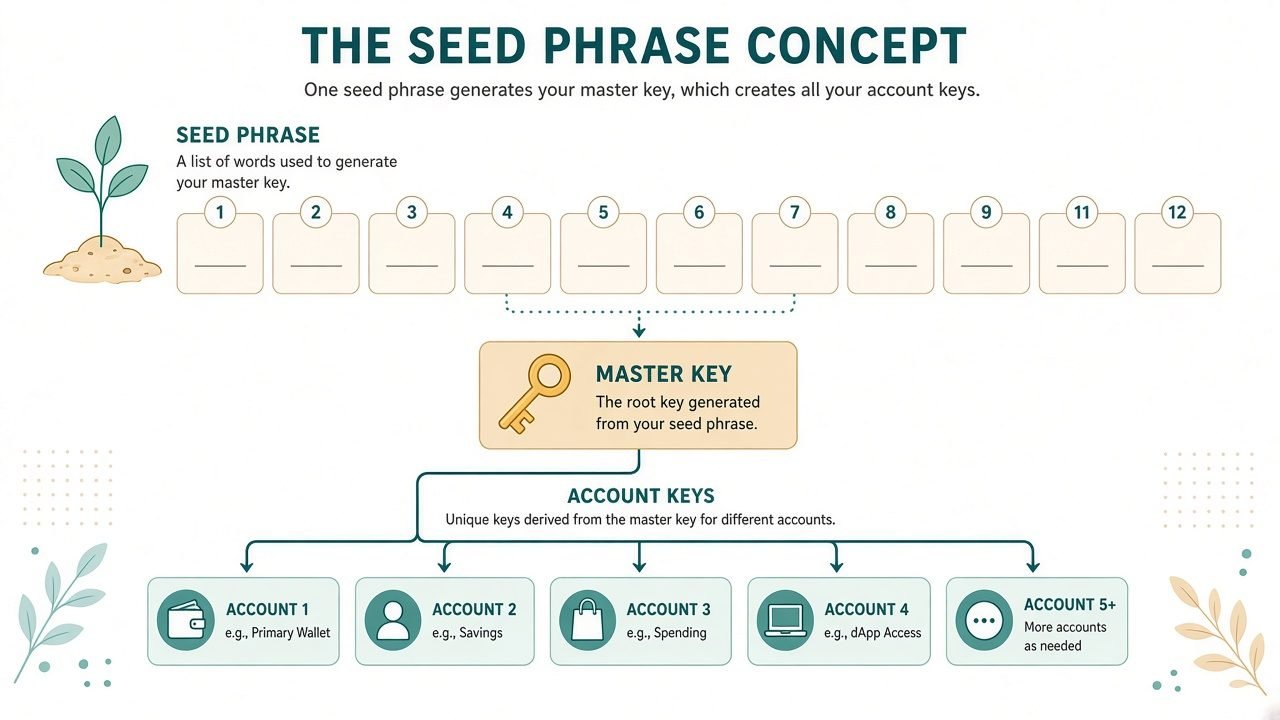
This guide explains what a seed phrase is, how the widely used BIP39 standard works at a conceptual level, how it differs from a password, how to store it offline, and what to do if you believe it has been exposed. It is written for U.S. readers who want clear, practical crypto security literacy—not trading advice.
What a seed phrase actually is
A seed phrase is an ordered sequence of words generated by your wallet software or hardware device when you create (or reset) a self-custody wallet. Common lengths are 12 or 24 words, though some products support other valid BIP39 lengths. The words are not random dictionary picks in the everyday sense; they come from a fixed wordlist defined by a standard, and their order encodes cryptographic entropy.
People use several names for the same idea:
- Seed phrase — common industry shorthand
- Recovery phrase — emphasizes the backup/restore purpose
- Mnemonic or mnemonic phrase — technical term for a memorable word sequence that represents binary data
- Secret recovery phrase — wording used by some wallet products to stress confidentiality
Whatever the label, the security rule is the same: the phrase is secret, complete control of it is control of the wallet, and it should not be typed into websites, shared in chat, emailed, photographed for “convenience,” or pasted into cloud notes.
A useful mental model is: your seed phrase is the master backup. From it, compatible wallets can derive the keys needed for addresses and transactions. Your everyday password (if the app has one) may only unlock the local app or device UI. The seed phrase sits at a deeper layer.
Why wallets use words instead of long hex strings
Private keys and seeds are large random numbers. Writing a raw hex string by hand is error-prone. BIP39—Bitcoin Improvement Proposal 39—describes a widely adopted method for turning random data into a mnemonic sentence that people can copy more accurately than a long string of digits and letters.
Conceptually, BIP39 does two jobs:
- Generate a mnemonic from secure random entropy, with a checksum so many typos can be detected later.
- Convert that mnemonic into a binary seed, which wallet software can then use with hierarchical deterministic (HD) wallet standards to derive many keys in a predictable tree.
You do not need to implement BIP39 yourself to use a wallet safely. You do need to understand the implications: the words are the backup. Correct order matters. Missing or swapping a word usually breaks recovery. And because derivation is deterministic, the same valid phrase restores the same wallet on compatible software—whether that restore is done by you on a new phone or by an attacker who obtained your backup.
BIP39 in plain English (conceptual overview)
Here is the BIP39 idea without code or implementation steps.
Entropy and word count. The wallet generates a random number (entropy). Longer entropy produces longer mnemonics. A 12-word BIP39 phrase corresponds to 128 bits of entropy plus a checksum; a 24-word phrase corresponds to 256 bits of entropy plus a checksum. More entropy means a vastly larger space of possible phrases, which is why guessing a properly generated phrase is not practical.
Wordlist mapping. BIP39 maps chunks of that entropy (plus checksum bits) to words from a fixed list of 2,048 words. Each word represents an index into that list. The English list is the most common in consumer wallets; other language lists exist, but you should recover with the same wordlist language your wallet used.
Checksum. A small checksum is embedded so that many invalid or mistyped phrases can be rejected. A checksum does not mean “safe to share.” It only helps detect some errors when you restore.
From mnemonic to seed. The mnemonic sentence is then stretched into a binary seed using a key-derivation function (PBKDF2 with HMAC-SHA512 in the BIP39 specification). That binary seed is what feeds HD key derivation. Optional passphrases (sometimes marketed as a “25th word”) can change the derived wallet; if you use one, losing the passphrase can be as catastrophic as losing the mnemonic itself. Treat optional passphrases with the same seriousness as the phrase.
Compatibility caveat. BIP39 is widely supported, but not every product uses identical recovery formats. Some devices use multi-share schemes (for example SLIP39). Always follow the recovery instructions for your wallet brand, and never “test” a live seed phrase in an unverified app.
Seed phrase vs password: the difference that trips people up
U.S. internet users are trained to treat passwords as resettable. Forgot your bank password? Call support, verify identity, reset. Forgot your email password? Use a recovery code or phone number. That mental model is dangerous when applied to self-custody crypto.
| Topic | Typical account password | Seed / recovery phrase |
|---|---|---|
| What it unlocks | An account on a company’s servers | The cryptographic keys to a self-custody wallet |
| Who can reset it | The service provider (usually) | Nobody—there is no “forgot seed phrase” desk |
| What sharing does | May compromise one account | Often compromises the entire wallet and funds |
| Best storage | Password manager (for most web accounts) | Offline, private physical backup for the seed |
| If lost | Account recovery flows may exist | Access can be permanently lost |
A wallet app PIN or password may protect the device interface. That is useful. It is still not a substitute for protecting the seed phrase. If someone obtains your seed phrase, they can typically restore the wallet elsewhere even if they never knew your phone PIN.
Custodial accounts (funds held by an exchange or similar platform) are a different model: you usually log in with username/password plus multi-factor authentication, and the company holds the keys. Self-custody flips that responsibility onto you. Seed phrases belong to the self-custody world.
What a seed phrase can recover—and what it cannot
It can recover: access to a compatible non-custodial wallet whose keys were derived from that phrase, including the ability to see balances and authorize transfers of assets controlled by those keys (subject to network fees and any account-specific complications).
It does not magically fix: sending crypto to the wrong address, approving malicious smart-contract permissions, falling for a fake “support” agent, or losing funds that were never in that wallet. Recovery restores keys, not every bad outcome.
Also, a seed phrase for Wallet A does not restore Wallet B. Each wallet creation event that generates a new phrase creates a new backup boundary. Label physical backups carefully (without including the words themselves in digital photos or cloud labels that leak content).
The never-share rule
Treat these as hard rules for ordinary users:
- Never share your seed phrase with anyone—not friends, not “support,” not influencers, not strangers in Discord/Telegram, not someone claiming to be from your wallet company.
- No legitimate company needs your seed phrase to help you. Real support will not ask you to type your recovery phrase into a website form to “verify,” “sync,” “unstake,” “stop a hack,” or “claim a refund.”
- Never enter your seed phrase into a website unless you are deliberately restoring into software you intentionally installed and verified—and even then, only when you initiated a restore on a device you control.
- Do not paste it into email, SMS, notes apps synced to the cloud, password-manager notes shared across devices carelessly, screenshots, or chat apps.
- Do not “verify” your phrase on a random site that offers to check validity. Phishing pages are built for exactly that moment of panic or curiosity.
Scammers exploit urgency and fear: locked accounts, fake law-enforcement notices, “limited-time airdrops,” and screen-sharing sessions that watch you reveal backups. If someone asks for your secret recovery phrase, that request alone is a red flag.
Offline storage: why “not on the internet” matters
Because the seed phrase is equivalent to master access, the safest default for most individuals is offline storage: a durable physical copy kept private, with order preserved, away from casual discovery.
Practical offline principles:
- Write it down carefully during wallet setup, double-checking spelling and order before you fund the wallet.
- Store it somewhere private and reasonably protected from fire, water, and theft—balanced against your own threat model and home situation.
- Avoid digital copies as a default: photos, screenshots, cloud drives, email drafts, and messaging backups create extra copies you may forget.
- Consider durability. Paper works for many people if protected; metal backups are popular for fire/water resistance. Choose methods you can execute correctly; a fancy backup done wrong is worse than a simple one done right.
- Limit who knows where it is. Household privacy matters. So does not leaving the phrase in a wallet, glove box, or desk drawer labeled “crypto.”
- Plan for life events. Illness, travel, and inheritance are real issues for U.S. holders. Educational planning belongs in a separate, careful process—never by texting the phrase to a relative “just in case.”
A follow-on practical guide on physical storage options (paper vs metal, split backups, and common mistakes) is a natural next read once you understand what the phrase is. The core idea here is simpler: keep the secret offline and unshared.
How seed phrases show up in real wallet life
First setup. When you create a non-custodial wallet, the product generates the phrase and asks you to record it. Some apps quiz you on a few words. That quiz is not a substitute for a full accurate backup.
Device loss. If your phone breaks or your hardware wallet is lost, the seed phrase is how you restore on a new device. Without it (or another valid backup method your product supports), you may be locked out permanently.
Migration. Moving between compatible wallets often means restoring with the same phrase. Only do this with software or hardware you trust, downloaded from official sources, and preferably verified.
Multiple accounts. HD wallets can derive many addresses from one seed. That convenience is why one leaked phrase can expose more than a single address.
If your seed phrase may be exposed (high-level response)
If you typed your phrase into a phishing site, shared it with a “helper,” stored it in a breached cloud account, or otherwise believe someone else may have it, treat the situation as urgent. At a high level:
- Assume the phrase is compromised. Do not wait to “see if anything happens.”
- Move funds to a newly generated wallet whose seed phrase was created securely and never exposed—using devices and apps you trust—as soon as you can do so safely.
- Stop using the old phrase. Retire that wallet backup from active use after assets are moved.
- Preserve evidence for reporting if you were scammed: URLs, usernames, transaction IDs, emails, and screenshots of the lure (not screenshots that unnecessarily republish your seed phrase into new apps).
- Report crypto-related scams in the United States to the FBI’s Internet Crime Complaint Center at https://www.ic3.gov/. Filing a complaint helps law enforcement track patterns; it is not a guarantee of recovery, and IC3 does not ask you to pay recovery firms to get help.
- Be wary of “recovery” services that appear after a scam. Secondary scams commonly target victims who are already shaken and searching for a fix.
This article does not invent case stories or claim specific outcomes. The point is preparedness: exposure of a seed phrase is a security incident, not a customer-service password reset.
Common myths and mistakes
“The words are just a reminder; the wallet company has a copy.” For true self-custody wallets, that is generally false. If a company can reset your access without your seed, you are usually in a custodial model.
“I’ll memorize it and skip writing it down.” Memory fails. Stress, time, and similar-looking words make this a fragile plan for funds you care about.
“I can keep a photo in a hidden album.” Hidden albums still live on networked devices and backups. Treat photos of seed phrases as high-risk digital copies.
“Support needs it to unlock staking rewards.” No. That is a classic social-engineering line.
“A 12-word phrase is unsafe compared with 24.” Both are widely used when generated properly. The bigger real-world risks are phishing, bad storage, malware, and human error—not an attacker randomly guessing a fresh BIP39 mnemonic.
“I tested my phrase on a ‘seed checker’ site.” If that site was malicious or logged inputs, you may have just exposed it.
How this fits into broader crypto security
Seed phrase literacy sits beside other basics: knowing whether you are using custodial or non-custodial storage, verifying wallet downloads, recognizing phishing, and understanding that blockchain transfers are hard to reverse. A seed phrase is not a magic shield against every scam. It is the master backup for self-custody keys—and protecting it is non-negotiable.
If you are still choosing a wallet type, learn what a crypto wallet is and how hot vs cold storage differ before you move meaningful amounts. If you already have a phrase, prioritize offline storage discipline and refuse any request to share it. If you suspect phishing involving recovery phrases, study how those scams work and report them.
Key takeaways
- A seed phrase (recovery phrase / mnemonic / secret recovery phrase) is a word backup that can restore self-custody wallet keys.
- BIP39 is the common standard that maps random entropy to an ordered wordlist mnemonic and then to a binary seed—conceptually a readable backup of critical secret material.
- It is not like a resettable website password. Loss can mean permanent loss of access; disclosure can mean loss of funds.
- Never share it. No legitimate support agent needs it.
- Prefer offline, private storage with accurate spelling and order; avoid casual digital copies.
- If exposed, treat it as compromised, move to a new secure wallet when safe, keep evidence, and U.S. victims can report scams at https://www.ic3.gov/.
Self-custody gives you control—and responsibility. Knowing what a seed phrase is, and what it is not, is the foundation of that responsibility.
Frequently Asked Questions
What is a seed phrase in crypto?
A seed phrase is an ordered list of words (often 12 or 24) that backs up the secret material used to regenerate a non-custodial wallet’s keys. It is also called a recovery phrase, mnemonic, or secret recovery phrase.
Is a recovery phrase the same as a mnemonic?
In everyday wallet use, yes—these terms usually refer to the same BIP39-style backup words. Product screens may use different labels, but the security implications match: keep it secret and offline.
Does BIP39 mean every wallet restores the same way?
BIP39 is widely used, but products can differ (word count options, optional passphrases, or alternative backup schemes). Always follow your wallet’s official recovery guidance and never test a live phrase in unverified tools.
Why can’t I reset a lost seed phrase like a password?
Self-custody wallets are designed so that no central administrator holds your keys. Without the seed (or another valid backup your product supports), there is typically no reset path.
Where should I store my seed phrase?
Default to a private offline backup you can read accurately years later—protected from casual discovery and realistic household risks. Avoid screenshots, email, and cloud notes as your primary copy.
What should I do if I shared my seed phrase or entered it on a fake site?
Assume compromise, move assets to a newly created secure wallet when you can do so safely, stop using the exposed phrase, keep evidence of the scam, and consider reporting at https://www.ic3.gov/ if you are in the United States.
Will reporting to IC3 get my crypto back?
IC3 is the FBI’s central hub for reporting cyber-enabled crime. Reports help law enforcement understand and investigate patterns; recovery is not guaranteed. Be cautious of anyone claiming they can recover funds for a fee after you report.